

The sticker price never tells the full story with email marketing software. Both Mailchimp and ConvertKit (now officially rebranded as Kit) advertise prices that look reasonable at first glance. Then your list grows, you enable a few automations, and suddenly your monthly bill is 40% higher than what you signed up for.
I’ve set up email workflows on both platforms for digital projects — testing broadcast campaigns, building automation sequences, and watching exactly where the billing gets ugly. This article gives you the real cost comparison at every meaningful list size, not just the entry-level numbers that look good on a pricing page.
Note: ConvertKit officially rebranded to Kit in October 2024. The product is identical — same features, same codebase. This article uses both names since most people still search for ConvertKit.
Table of Contents
TL;DR — Mailchimp vs ConvertKit at a Glance
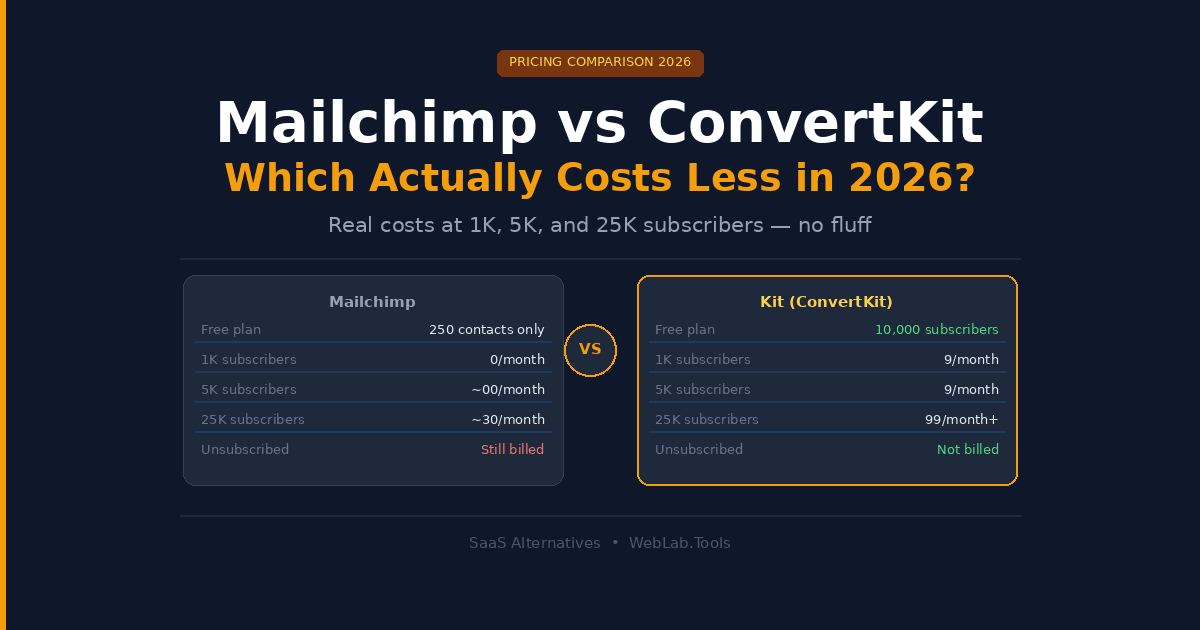
| Mailchimp | ConvertKit (Kit) | |
|---|---|---|
| Free plan | 250 contacts, 500 sends/mo | 10,000 subscribers, unlimited sends |
| Starting paid price | $13/month (500 contacts) | $39/month (1,000 subscribers) |
| At 5,000 subscribers | ~$100/month (Standard) | $89/month (Creator) |
| At 25,000 subscribers | ~$230/month (Standard) | $199/month+ (Creator) |
| Automation on free plan | None (removed 2025) | 1 basic automation |
| Counts unsubscribed contacts | Yes — major hidden cost | No — active only |
| Best for | E-commerce, multi-channel teams | Creators, newsletters, digital products |
The Hidden Cost Problem Nobody Talks About
Before comparing plans, there is one Mailchimp billing mechanic that changes the entire cost calculation — and most comparison articles bury it in footnotes.
Mailchimp counts unsubscribed contacts toward your paid limit.
Subscribed, unsubscribed, and non-subscribed contacts all count equally unless you manually archive or delete them. Someone who opted out two years ago and will never receive another email from you still occupies a paid slot. For businesses that have been on Mailchimp for 12+ months, 20–40% of their contact count is typically dead weight inflating the bill.
ConvertKit counts only active, unique subscribers. If someone unsubscribes, they drop off your billable count automatically.
This single difference means that at identical real audience sizes, Mailchimp users routinely pay for 20–30% more contacts than they actually have. Run that math across 5,000 or 10,000 subscribers and the gap is significant.
What Mailchimp Actually Costs in 2026
Mailchimp has changed its pricing twice already in 2026. In January, the free plan was cut from 500 contacts to 250 contacts with sends capped at 500 per month — down from 2,000 contacts in 2022. All automation was stripped from the free tier. Then in April, legacy account holders (accounts created before May 2019) were hit with an 11–13% price increase.
- Free: 250 contacts, 500 sends/month, no automation, Mailchimp branding
- Essentials: $13/month at 500 contacts — scales to ~$75/month at 5,000 contacts
- Standard: $20/month at 500 contacts — scales to ~$100/month at 5,000 contacts, ~$230/month at 25,000 contacts
- Premium: $350/month at 10,000 contacts — for large teams needing unlimited users and priority support
The Essentials plan covers basic scheduling and A/B testing but caps you at simple single-step automations. Multi-step customer journeys — the kind that actually drive revenue — are Standard and above. That means the true entry point for serious email marketing is $20/month minimum, scaling fast.
The automation removal that caught teams off guard: In mid-2025, Mailchimp deprecated its Classic Automation Builder and moved all multi-step automations exclusively to the Standard plan. Teams running welcome sequences or drip campaigns on Essentials suddenly needed to upgrade. If you built workflows on Essentials before that change, you’ll know exactly how disruptive this was.
What ConvertKit (Kit) Actually Costs in 2026
Kit’s pricing is simpler and more honest than Mailchimp’s. Three tiers, subscriber-based pricing, unlimited email sends on every plan, and no billing for unsubscribed contacts.
The free Newsletter plan is genuinely one of the most generous in email marketing — up to 10,000 subscribers at $0, with unlimited broadcasts, landing pages, and forms. The catch: you’re limited to one basic automation and one sequence, Kit branding appears on your emails, and you must enable the Recommendations feature (which promotes other Kit newsletters to your subscribers).
- Newsletter (Free): Up to 10,000 subscribers, unlimited sends, 1 automation, 1 sequence, Kit branding
- Creator: $39/month at 1,000 subscribers — $59/month at 3,000 — $89/month at 5,000 — $199/month+ at 25,000 subscribers (billed monthly). Annual billing drops Creator to approximately $33/month at 1,000 subscribers.
- Creator Pro: $79/month at 1,000 subscribers — adds subscriber scoring, advanced A/B testing, newsletter referral system, and priority support
What most Kit reviews miss: Kit raised prices significantly in September 2025. The Creator plan previously started at $15/month. It now starts at $39/month for the same 1,000-subscriber entry point — a 160% price increase. Existing users on the old pricing were migrated. If you evaluated Kit before September 2025 and dismissed it as affordable, the economics have changed materially.
Real Cost Comparison by List Size
This is what actually matters. Not the starting price — what you pay when your list is real.
At 1,000 subscribers:
- Mailchimp Standard: $20/month
- Kit Creator: $39/month (monthly) / $33/month (annual)
- Winner: Mailchimp — cheaper entry point for small lists
At 5,000 subscribers:
- Mailchimp Standard: ~$100/month
- Kit Creator: $89/month
- Winner: Kit — and remember Mailchimp’s count likely includes inactive contacts inflating the number
At 10,000 subscribers:
- Mailchimp Standard: ~$135/month
- Kit Creator: ~$119/month
- Winner: Kit — gap widens, especially once you clean Mailchimp’s inflated contact count
At 25,000 subscribers:
- Mailchimp Standard: ~$230/month
- Kit Creator: $199/month+
- Winner: Kit — and at this list size the unsubscribed-contact problem on Mailchimp costs an extra $30–60/month in overinflated billing
Pricing verified from multiple independent sources, May 2026. Verify exact figures at official pricing pages before publishing — both platforms adjust pricing by contact tier regularly.
Automation: Where the Real Difference Lives
Price per subscriber is one metric. Automation quality is the one that drives revenue.
Mailchimp automation on Standard includes Customer Journey Builder — a drag-and-drop visual workflow tool that handles branching logic, behavioral triggers, and time delays. It’s genuinely capable for e-commerce use cases: abandoned cart sequences, post-purchase flows, win-back campaigns. Mailchimp integrates natively with Shopify, WooCommerce, and Magento, pulling product data directly into automated emails.
I tested a basic 3-step welcome sequence on Mailchimp Standard. Setup was straightforward, and the branching logic editor is cleaner than it was two years ago. The issue is that the automation sits inside a product that keeps changing underneath you — features removed from lower tiers, billing mechanics that punish list growth.
Kit automation on the Creator plan gives you unlimited visual automation funnels and unlimited sequences. The workflow builder is simpler than Mailchimp’s but more reliable for content-driven sequences. Tags and segments drive the logic — tag a subscriber as “bought course A” and trigger a completely different sequence automatically. For creators selling digital products or building paid newsletters, that tagging system is more useful than Mailchimp’s e-commerce triggers.
The meaningful difference: Mailchimp automation is built around purchasing behavior. Kit automation is built around subscriber behavior and content consumption. If you sell physical products, Mailchimp wins. If you sell knowledge, courses, or subscriptions, Kit wins.
Deliverability — The Metric That Actually Determines ROI
You can have the best automation in the world and it means nothing if your emails land in spam. Both platforms have strong deliverability track records, but there are real differences.
Mailchimp’s shared sending infrastructure means your deliverability is partly dependent on the behavior of other users on the same IP pool. Spammers on Mailchimp’s shared IPs affect everyone. The Premium plan offers a dedicated IP, but that starts at $350/month.
Kit has built its reputation specifically around creator deliverability. Because the platform actively filters out high-volume cold email senders and focuses on permission-based lists, the sender reputation tends to be cleaner. Independent deliverability tests across 2025 and early 2026 consistently show Kit landing in the primary inbox at a higher rate than Mailchimp on comparable content.
For newsletters and content businesses where inbox placement directly drives open rates and revenue, this matters more than most pricing comparisons acknowledge.
Who Should Choose Mailchimp
Choose Mailchimp if:
- You run an e-commerce store on Shopify, WooCommerce, or Magento and need native product data in your email automations
- Your team has multiple users who need role-based access to email campaigns (Essentials and above)
- You want a single platform for email, SMS, landing pages, and basic website features
- Your subscriber list is under 1,000 and you want the cheapest paid entry point
Skip Mailchimp if:
- Your list has been active for more than a year and you haven’t regularly cleaned unsubscribed contacts — audit your billable count before your next renewal
- You rely on automations and are not on Standard or above — the free and Essentials tiers no longer support meaningful workflow automation
- You are on a legacy plan created before May 2019 and haven’t evaluated your current cost since April 2026
Who Should Choose ConvertKit (Kit)
Choose Kit if:
- You’re a creator, blogger, coach, podcaster, or newsletter operator whose revenue comes from the relationship with your audience rather than transactions
- You want to sell digital products, paid newsletters, or courses directly through your email platform without a separate tool
- Your list is under 10,000 subscribers and you want to grow without paying anything during the early stage
- You need reliable deliverability for content emails where inbox placement directly affects open rates and revenue
Skip Kit if:
- You run an e-commerce business that needs deep product integration and abandoned cart automation — Mailchimp or Klaviyo serve that use case better
- Your list is under 1,000 subscribers and you need advanced automation immediately — at $39/month the entry cost is high for a small list
- You don’t need the creator-economy features (digital product sales, paid newsletters, Creator Network) and just want a cheap email sender — MailerLite or Brevo will cost less
FAQ
Is ConvertKit still called ConvertKit in 2026?
No. The platform officially rebranded to Kit in October 2024. The product, features, and team are identical — only the name changed. Most people still search for ConvertKit, which is why both names appear throughout this article. The official URL is now kit.com.
Does Mailchimp charge for unsubscribed contacts?
Yes. Mailchimp counts subscribed, unsubscribed, and non-subscribed contacts equally toward your plan limit. The only way to stop paying for unsubscribed contacts is to manually archive or delete them. This is one of the most significant hidden costs for businesses with older Mailchimp lists.
Which is better for a newsletter business — Mailchimp or Kit?
Kit is the stronger choice for newsletter operators. The free plan supports up to 10,000 subscribers, the automation is built around content consumption and tagging rather than purchase behavior, and deliverability for content emails is consistently strong. Mailchimp is a better fit for e-commerce email marketing than pure newsletter publishing.
Did Kit (ConvertKit) raise its prices recently?
Yes. Kit raised Creator plan pricing significantly in September 2025. The plan previously started at $15/month for 1,000 subscribers — it now starts at $39/month, a 160% increase at the entry tier. If you evaluated Kit before that date and dismissed it as the affordable option, re-run the numbers.
At what list size does Kit become cheaper than Mailchimp?
Around 3,000–5,000 subscribers, Kit’s Creator plan becomes cost-competitive with or cheaper than Mailchimp Standard — particularly once you account for Mailchimp’s unsubscribed-contact billing inflating the real count. Below 1,000 subscribers, Mailchimp Standard at $20/month is cheaper than Kit Creator at $39/month.
Final Verdict
Neither tool is universally cheaper. The answer depends entirely on what you’re building.
Mailchimp costs less at small list sizes (under 1,000 subscribers) and for e-commerce businesses that need native product integrations. But pricing changes twice in four months in 2026 and the removal of automation from lower tiers have made it a harder tool to trust for long-term planning.
Kit costs less at 5,000 subscribers and above — especially once you factor in Mailchimp’s unsubscribed-contact billing. The 10,000-subscriber free plan is the best free tier in email marketing if you’re building a newsletter or creator business from scratch.
If you’re choosing between them today: build your first 10,000 subscribers on Kit’s free plan, then evaluate whether Creator at $39/month or a cheaper alternative like MailerLite makes more sense once you have real revenue to justify the cost.
For a broader look at tools that work alongside your email platform, see our ClickUp Alternatives 2026 roundup — several teams use project management tools to manage their content and email calendars in one place.

