
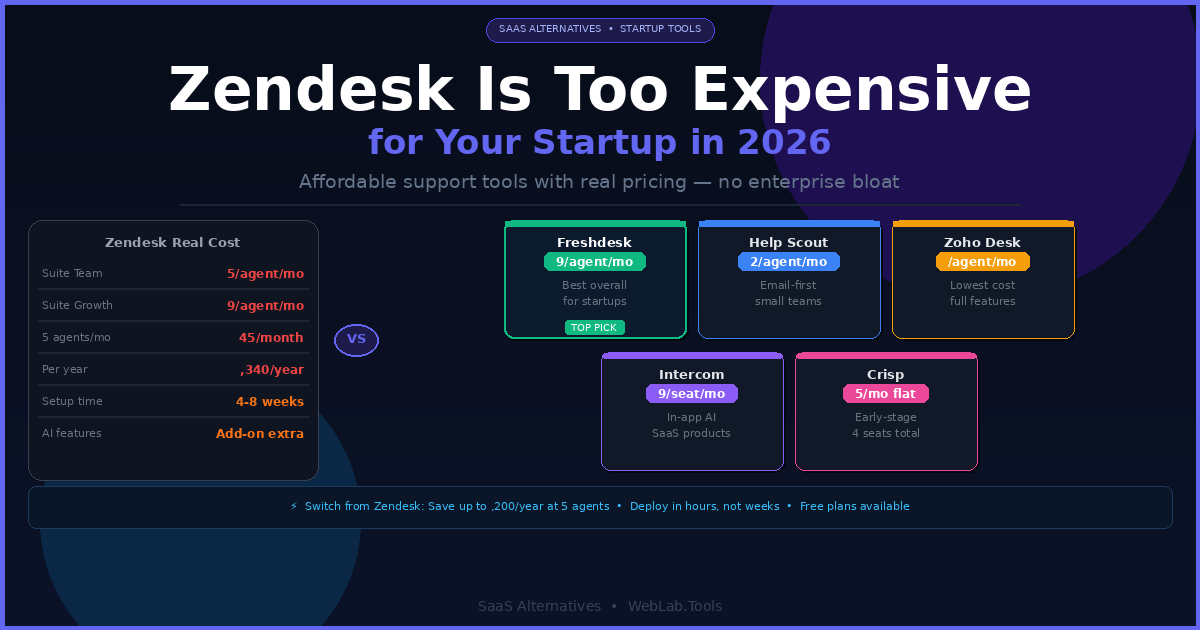
Zendesk is not a bad product. It’s a wrong-sized product for most startups. The Suite Team plan starts at $55 per agent per month — and that’s the entry point most teams find too limited, prompting an upgrade to Suite Growth at $89 per agent per month before the implementation is even finished. A 5-person support team is looking at $445 per month minimum, often $2,250+ per month once you add the automation features you actually need. Then there’s the setup time. Zendesk implementations routinely take 4–8 weeks for teams without a dedicated admin.
For a 10-person SaaS startup where the founder is still handling tier-2 support tickets and one person manages the helpdesk part-time, that cost-to-complexity ratio is genuinely bad.
I’ve set up and evaluated support tooling across digital projects at different team sizes. The insight that most Zendesk comparison articles miss: the right alternative depends almost entirely on which part of Zendesk you’re actually using. If it’s mostly email ticketing — the alternative is radically different from a team that needs live chat, AI resolution, and multi-channel routing. This article matches tools to use cases rather than producing a generic ranked list.
Table of Contents
The Real Zendesk Problem for Startups in 2026
Before comparing tools, three things worth being direct about.
Zendesk’s pricing is more expensive than it appears. The Suite Team plan at $55/agent/month excludes self-service portals, multilingual support, and advanced automation. Most startups discover they need Suite Growth at $89/agent/month to run the support operation they actually have. At 3 agents, that’s $267/month. At 5 agents, $445/month. At 10 agents, $890/month. And Zendesk AI features — including their Copilot — are add-ons on top of that.
AI in Zendesk is an add-on, not a feature. Zendesk’s AI tools were acquired and bolted on rather than built natively. The result is add-on pricing that makes AI-powered ticket resolution meaningfully more expensive than competitors that built AI into their core product.
Implementation complexity is a real cost. A Zendesk deployment for a 5-10 agent team takes a dedicated person 4–8 weeks. During that time, your support quality degrades and your team is learning a new system while handling live customers. Alternatives like Freshdesk or Help Scout deploy in days.
Quick Comparison — Zendesk vs 5 Alternatives
| Tool | Free Plan | Starting Price | Best For | AI Included | Setup Time |
|---|---|---|---|---|---|
| Zendesk | No | $55/agent/month | Enterprise, complex ops | Add-on | 4–8 weeks |
| Freshdesk | Yes (10 agents) | $19/agent/month | Growing startups, SMBs | Yes (Freddy AI) | 1–2 days |
| Help Scout | Limited (free tier) | $22/agent/month | Small teams, email-first | Basic | Half a day |
| Zoho Desk | Yes (3 agents) | $7/agent/month | Budget, Zoho ecosystem | Yes (Zia) | 1 day |
| Intercom | No | $39/seat/month + AI | In-app chat, SaaS products | Fin AI (native) | 2–3 days |
| Crisp | Yes | $25/month flat (4 seats) | Very early stage startups | Basic | Hours |
All prices as of May 2026 — confirm at each tool’s official pricing page before purchasing.
1. Freshdesk — Best Overall Zendesk Alternative for Startups
Freshdesk is the tool I point most startups toward first, and the reason is simple: the free plan supports up to 10 agents with real ticketing functionality. For a seed-stage startup where two or three people are handling support across email and chat, you can run Freshdesk’s free tier for months without hitting a wall that forces a paid upgrade.
When you do need to upgrade, Growth at $19/agent/month is roughly one-third of Zendesk Suite Team’s cost. It includes workflow automation, SLA management, collision detection (knowing when two agents are viewing the same ticket simultaneously), and Freddy AI for basic ticket suggestions and canned responses. These are features Zendesk gates behind its mid-tier plans.
The setup time difference is real. I’ve had Freshdesk configured, connected to a support email, and routing tickets in under two hours on a fresh account. Zendesk’s equivalent configuration takes days and involves routing rules, triggers, automations, and view configurations that require deliberate architectural thinking before you touch anything. Freshdesk’s defaults are sensible — Zendesk’s are not.
What most Freshdesk reviews miss: Freshdesk’s pricing table looks simpler than it is. The omnichannel product (email + chat + phone + social in one inbox) is called Freshdesk Omni and is priced separately from the core email ticketing product. If you need live chat and email in the same interface, you’re looking at Freshdesk Omni Growth which starts higher than the core Growth plan. Also, Freddy AI’s email agent charges per session above 500 monthly resolutions — at $49 per 100 sessions — which makes AI costs unpredictable during traffic spikes. Monitor usage carefully before committing to AI-heavy workflows.
Pricing as of May 2026 — confirm at freshdesk.com/pricing:
- Free: Up to 10 agents — email ticketing, knowledge base, basic automations
- Growth: $19/agent/month (annual) — SLA management, automation, Freddy AI basic
- Pro: $55/agent/month (annual) — custom roles, multilingual, round-robin routing
- Enterprise: $89/agent/month (annual) — audit logs, approval workflows, skill-based routing
- Freddy AI Copilot add-on: $29/agent/month on Growth+
Best for: SaaS startups and SMBs with 2–50 agents who want a capable ticketing system with a real free tier and a growth path that doesn’t triple in price at every tier.
Skip if: You need omnichannel (chat + email + phone) on a single plan from day one — the Freshdesk product split means you’ll pay for Freshdesk Omni separately, which changes the cost calculation.
2. Help Scout — Best for Email-First Support Teams
Help Scout is the tool that small SaaS teams reach for when they want customer support to feel like a conversation rather than a ticket system. There are no ticket numbers, no status fields cluttering the view — just a shared inbox that behaves like email, with the collaborative tools a support team needs underneath.
The core workflow is a shared inbox where agents can assign conversations, leave private notes for each other, and see in real time whether a colleague is already responding (collision detection is built in, not an upgrade). For a startup where the entire support team is 2–4 people, that simplicity dramatically reduces onboarding time. New support hires are typically productive in Help Scout within their first shift.
The Docs feature — Help Scout’s knowledge base builder — is included on all paid plans and is one of the cleanest knowledge base editors in the category. Articles are searchable from within the Beacon widget that embeds on your product. When a customer starts typing a support request, Beacon suggests relevant docs first — deflecting tickets before they’re submitted. For early-stage startups trying to scale support without scaling headcount, that deflection is worth real money.
The honest limitation: Help Scout is email-first by design. It has a live chat widget (Beacon) but it’s lighter than Intercom’s or Freshdesk’s chat implementations. If your customers need real-time live chat as a primary support channel — not just an embedded help widget — Help Scout will feel limited. The platform also has no phone support natively, and reporting, while solid, doesn’t match Zendesk’s depth for teams that need complex custom dashboards.
Pricing as of May 2026 — confirm at helpscout.com/pricing:
- Free tier: Available with limited features — up to 5 users
- Standard: $22/agent/month (annual) — 2 inboxes, Beacon widget, Docs knowledge base
- Plus: $44/agent/month (annual) — custom fields, API access, advanced reporting
- Pro: Custom pricing — enterprise features, SLA, dedicated account manager
Best for: B2B SaaS startups with 2–20 agents running email-first support who want a clean, fast-to-deploy tool without enterprise complexity or ticket-system overhead.
Skip if: Live chat is a primary support channel, you need phone support, or your team requires advanced workflow automation comparable to Zendesk’s trigger and macro system.
3. Zoho Desk — Best for Budget-Conscious Teams
Zoho Desk is the most affordable serious help desk on this list. The free plan covers 3 agents with email ticketing. The Express plan at $7/agent/month is the lowest entry point for a paid tier in the category. The Standard plan at $14/agent/month includes multi-channel support, automation workflows, and SLA management that Zendesk charges $55/agent/month to access.
That price-to-feature ratio is genuinely unusual. Zoho Desk’s Enterprise plan at $40/agent/month — their highest published tier — costs less than Zendesk’s entry-level Suite Team plan at $55/agent/month. For startups where budget is the primary constraint, that comparison ends the conversation early.
Zia, Zoho’s AI assistant, is included on higher tiers and handles ticket tagging, anomaly detection in ticket volumes, sentiment analysis, and knowledge base article suggestions to agents. It’s not as polished as Intercom’s Fin AI but it’s meaningfully capable and included in the plan cost rather than charged per resolution.
The additional argument for Zoho Desk is ecosystem fit. If your startup is already using Zoho CRM, Zoho Books, or other Zoho products, Desk integrates natively and shares customer data across the suite without middleware. Zoho One at $37/user/month bundles 45+ Zoho apps including Desk — which makes Desk effectively free if you’re buying the full suite for CRM and accounting.
The honest limitation: Zoho Desk’s interface is functional but dated. It doesn’t feel like a modern SaaS product in 2026. Startups with design-conscious teams or customers who interact with the support portal publicly may find the aesthetic friction noticeable. The learning curve is also steeper than Help Scout or Crisp — not as complex as Zendesk, but meaningfully more configuration-heavy than simpler alternatives.
Pricing as of May 2026 — confirm at zoho.com/desk/pricing:
- Free: Up to 3 agents — email ticketing, basic help center
- Express: $7/agent/month (annual) — social media channels, CSAT, basic automation
- Standard: $14/agent/month (annual) — live chat, multi-channel, workflow automation
- Professional: $23/agent/month (annual) — Zia AI, custom dashboards, telephony
- Enterprise: $40/agent/month (annual) — multi-brand portals, advanced AI, sandbox
Best for: Budget-constrained startups, teams already in the Zoho ecosystem, and businesses where cost-per-feature is the primary evaluation metric.
Skip if: Your team prioritizes design quality and modern UX, or you need Slack-native support without integration workarounds.
4. Intercom — Best for SaaS Products With In-App Support
Intercom is a different category of tool from the others on this list. Where Freshdesk, Help Scout, and Zoho Desk are helpdesks that support email-first workflows, Intercom is built around the product experience — in-app messaging, proactive outreach to users based on behavior, onboarding tours, and AI resolution that operates inside the product rather than via email tickets.
Fin, Intercom’s AI agent, is genuinely the most capable AI customer resolution tool in the startup segment in 2026. It resolves routine support queries autonomously — “how do I export my data?”, “where is my invoice?”, “how do I add a team member?” — without routing to a human agent. Resolution rate for well-documented products typically runs 40–60% of inbound queries. At $0.99 per AI resolution, a team handling 500 queries per month and achieving 50% AI resolution rate pays $247 in AI resolution costs on top of their base subscription. The math works cleanly for most early-stage SaaS teams if average ticket cost (agent time) exceeds $2 per ticket.
Intercom’s startup program is worth noting for early-stage teams. Qualifying startups (typically under 2 years old with venture backing or under a revenue threshold) access Intercom at significantly reduced rates for 12 months. If you’re a funded SaaS startup in the first year, check the startup program before evaluating at standard pricing.
The honest limitation: Intercom’s pricing scales with usage in ways that create unpredictable monthly bills. The $39/seat/month base price plus $0.99 per AI resolution plus potential conversation volume fees across multiple channels means a team handling 2,000+ tickets per month can see their Intercom bill jump significantly in a high-traffic month. Startups with volatile traffic patterns — product launches, press coverage, seasonal spikes — need to model worst-case monthly costs before committing.
Pricing as of May 2026 — confirm at intercom.com/pricing:
- Essential: $39/seat/month — shared inbox, Fin AI, basic automation
- Advanced: $99/seat/month — workflow builder, multiple inboxes, custom reports
- Expert: $139/seat/month — workload management, SSO, HIPAA
- Fin AI resolution: $0.99 per resolution (above free tier)
- Startup program: significantly discounted — check eligibility at intercom.com/startups
Best for: SaaS products where support lives inside the product itself — in-app messaging, proactive onboarding, and AI-first resolution for documentation-heavy products with repeatable queries.
Skip if: Your support is primarily email-based, you have unpredictable traffic volume and can’t absorb per-resolution cost spikes, or you’re a non-SaaS business where in-app messaging is irrelevant.
5. Crisp — Best for Very Early Stage Startups
Crisp is the tool most people haven’t heard of and should have. It’s a shared inbox and live chat platform that covers the core startup support stack — email, live chat, knowledge base, chatbot, and mobile app — for $25/month flat for 4 seats on its Mini plan.
Not $25 per seat. $25 total. For 4 people.
At the pre-revenue or early-revenue stage where three founders are splitting support between product work, Crisp’s flat pricing model removes the per-seat anxiety entirely. The live chat widget deploys on your product or marketing site in under an hour. The shared inbox handles email alongside chat in one view. The knowledge base builder is simple but functional for an early-stage FAQ layer.
The MagicBrowse feature — which lets support agents see what the customer is currently looking at on your product in real time — is a genuinely useful context tool that most help desks charge significantly more for. For a live debugging session or onboarding call, that real-time context visibility reduces time-to-resolution meaningfully.
The honest limitation: Crisp is an early-stage tool. Once your support team grows past 5–6 people and ticket volume requires real workflow automation, SLA management, and reporting depth, Crisp’s ceiling becomes apparent. The automation layer is lighter than Freshdesk’s. Reporting is basic. Routing rules are simple. Crisp is excellent for getting from zero to organized — it’s not the tool that scales to 20 agents across a complex multi-product operation.
Pricing as of May 2026 — confirm at crisp.chat/pricing:
- Free: 2 seats, live chat, shared inbox, unlimited conversations
- Mini: $25/month — 4 seats, full knowledge base, chatbot, MagicBrowse
- Essential: $95/month — 10 seats, analytics, advanced routing, CRM features
- Plus: $295/month — unlimited seats, white-label, priority support
Best for: Pre-seed to Series A startups with 1–5 people handling support who need a live chat + email inbox combination at the lowest possible flat-rate cost.
Skip if: You need SLA management, advanced automation, or reporting depth — Crisp’s capabilities in these areas don’t match Freshdesk or Help Scout at comparable price points.
The Hidden Cost of Staying on Zendesk
Here’s the calculation most Zendesk comparison articles don’t run.
A 5-agent startup on Zendesk Suite Growth at $89/agent/month pays $445/month — $5,340/year. Switching to Freshdesk Growth at $19/agent/month costs $95/month — $1,140/year. That’s $4,200 per year in savings at identical team size.
Over 24 months — the typical time before a Series A startup re-evaluates its tooling — that’s $8,400. At a startup where runway is measured in months, $8,400 buys two additional months before the next fundraise. That’s not a trivial difference in the early stage.
The counter-argument from Zendesk is ecosystem depth and future-proofing. If you’re planning to scale to 50+ agents within 18 months, starting on Zendesk avoids a migration. That’s a legitimate consideration — but only if the growth trajectory is actually that aggressive. Most startups that stay on Zendesk “because we’ll need it eventually” never grow fast enough to justify the premium they paid in years one and two.
For teams already on Zendesk evaluating whether to migrate, see the Mailchimp vs ConvertKit piece on how switching costs in SaaS tools compare across different category types — the migration math is consistent across helpdesk, email marketing, and CRM tools in ways that inform the decision framework.
FAQ
What is the cheapest alternative to Zendesk for startups?
Zoho Desk is the cheapest paid alternative at $7/agent/month for the Express plan. Freshdesk’s free plan (up to 10 agents) is technically the cheapest starting point — $0 — and is meaningfully functional for a small team handling basic email ticketing. Crisp at $25/month flat for 4 seats is the most affordable live chat + email combination for early-stage teams.
Is Freshdesk good enough to replace Zendesk?
For the majority of startups and SMBs, yes. Freshdesk covers email ticketing, automation, SLA management, knowledge base, and AI-assisted responses at roughly one-third of Zendesk’s cost. The gaps where Zendesk outperforms Freshdesk are at enterprise scale — complex reporting customization, deep CRM integration, and large-team workflow management. Below 50 agents, most teams find Freshdesk’s capabilities sufficient.
Does Intercom replace Zendesk completely?
Not directly — they solve different problems. Zendesk is a traditional help desk built around ticket management. Intercom is a conversational support platform built around in-product messaging and AI resolution. Many SaaS teams run Intercom for in-app and chat support while using a traditional ticketing tool for email. The comparison is really Intercom vs Zendesk only if you’re choosing a single platform for all support channels.
How long does it take to migrate from Zendesk to Freshdesk?
Most small teams (under 10 agents, under 12 months of ticket history) complete the migration in 2–5 days. Freshdesk has a native Zendesk import tool that handles ticket history, customer records, and agent data. The longer tasks are rebuilding your automation rules and macros in Freshdesk’s format and retraining agents on the new interface. For teams with complex Zendesk configurations built over 2+ years, budget 2–3 weeks.
Which Zendesk alternative has the best AI in 2026?
Intercom’s Fin AI is the most capable AI resolution tool for startups in 2026 — resolving 40–60% of routine queries autonomously on well-documented products. Freshdesk’s Freddy AI is solid and included in paid tiers without heavy per-resolution fees. Zoho Desk’s Zia handles sentiment analysis and ticket tagging competently. The right answer depends on your AI use case: autonomous resolution (Intercom), agent assistance and triage (Freshdesk), or ticket categorization (Zoho Desk).

