

Building a faceless YouTube channel in 2026 is genuinely viable as a business model. Channels in finance, education, true crime, and AI explainers are earning $3,000–$10,000 per month without a camera, without a face, and without a production team. What changed is the tooling. A workflow that required three separate freelancers two years ago now runs on a $50–$100/month AI stack that a solo creator can operate in under an hour per video.
I’ve been testing various content automation workflows while managing content pipelines for SharifExpress and my other digital brands. The honest finding: the tools matter less than the workflow. Most creators waste money buying five separate tools that don’t connect cleanly. The stack that works is the one where script, voiceover, and visuals flow from one step to the next without manual re-exporting between platforms.
This article covers the six tools that belong in that stack — what each one does, what it genuinely costs, and where each one disappoints.
Table of Contents
The Faceless YouTube Production Workflow
Every faceless video goes through the same pipeline. Understanding it before choosing tools prevents buying the wrong thing for the wrong stage.
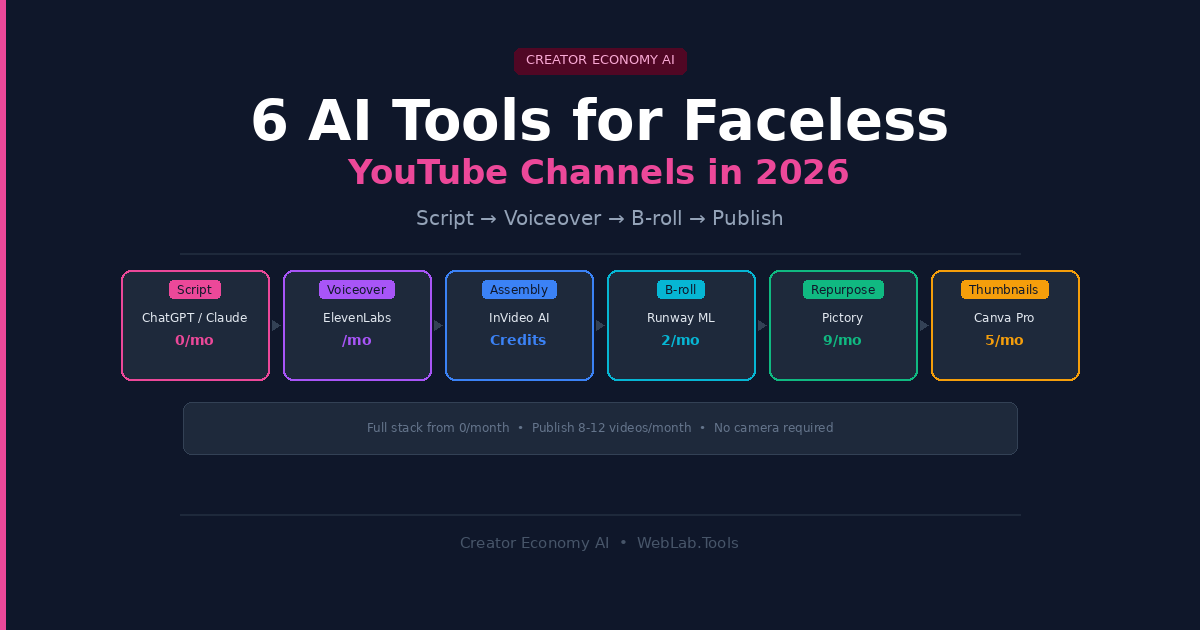
Script → Voiceover → B-roll and visuals → Assembly and captions → Thumbnail → Upload
Most tools on the market cover one or two of these stages. A smaller number cover the full pipeline in one interface. Neither approach is universally better — all-in-one tools trade control for speed; specialist stacks trade simplicity for quality. The right answer depends on your volume and how much you care about fine-tuning individual elements.
One thing that’s consistent across every working faceless channel: the script is the product. High-retention visuals over a weak script still underperforms. A great script with average B-roll still holds viewers. Get the script right first. Everything else is production.
Quick Comparison — 6 AI Tools for Faceless YouTube
| Tool | Stage | Free Plan | Starting Price | Best For |
|---|---|---|---|---|
| ChatGPT / Claude | Script | Yes | $20/month | Research + scripting |
| ElevenLabs | Voiceover | Yes (limited) | $5/month (Starter) | Realistic narration |
| InVideo AI | Full pipeline | Yes | Credit-based plans | Prompt-to-video automation |
| Pictory | Script-to-video | No | $19/month | Blog and script repurposing |
| Runway ML | B-roll generation | Yes (limited) | $12/month | Generative visual B-roll |
| Canva | Thumbnails | Yes | $15/month (Pro) | Thumbnails and channel art |
1. ChatGPT or Claude — Best for Scripting
The script stage is where most creators underinvest, and it’s the stage where AI delivers the clearest ROI. A well-prompted large language model produces a structured, hook-forward, retention-optimized script for a 10-minute video in under three minutes. That’s work that would take a human writer 90 minutes to two hours.
I use Claude for scripting across content projects because the outputs are longer-form and more analytically structured without extra prompting. ChatGPT’s strength is speed and versatility — it handles idea generation, title options, description writing, and keyword research in the same conversation. For a faceless channel workflow, having one AI tool handle the entire pre-production stage (niche research → title → script → description → tags) cuts overhead significantly.
The technique most scripting guides miss: Feed the AI the URL or title of a top-performing competitor video and ask for five alternative angles with a contrarian or underreported take. This avoids creating duplicate content that the algorithm has no reason to surface. Your video’s hook should answer a question the top results don’t ask.
What AI scripting can’t do: Verify facts. For any data-heavy niche — finance, health, legal education — human fact-checking before production is non-negotiable. An AI-generated script confidently stating wrong statistics in a monetized video creates reputational damage that traffic can’t fix. Build the verification step into your workflow as a standard gate before voiceover.
- ChatGPT Free: Available with GPT-4o access on free tier (limited)
- ChatGPT Plus: $20/month — faster access, GPT-4o, voice, image capabilities
- Claude Pro: $20/month — stronger long-form writing and structured output
Best for: All faceless channel niches. This is the non-negotiable first stage of the stack.
Skip if: Nothing to skip — every channel needs a scripting tool. The only decision is ChatGPT vs Claude, which comes down to personal preference after a one-week trial of each.
2. ElevenLabs — Best for Realistic AI Voiceover
Voice quality is the single biggest retention factor in faceless content after script quality. Viewers tolerate average B-roll. They abandon robotic-sounding narration within 30 seconds. ElevenLabs is the category leader on voice realism in 2026, and it’s not particularly close.
The Starter plan at $5/month gives you 30,000 characters per month with commercial usage rights — enough for approximately three to four 10-minute videos depending on script length. The Creator plan at $22/month increases that to 100,000 characters (roughly 30–40 minutes of audio), which supports a consistent upload schedule of 8–12 videos per month.
Voice cloning is where ElevenLabs pulls ahead of every alternative. Record one minute of yourself reading naturally — ElevenLabs generates a synthetic version of your voice that you can use for every future video without recording again. For channels where the “narrator voice” is part of the brand identity, this is genuinely useful. The cloned voice sounds distinctly more natural than any stock voice at equivalent quality levels.
What most ElevenLabs reviews miss: The free plan has no commercial usage rights. Any video you publish to a monetized YouTube channel using the free tier technically violates ElevenLabs’ terms. The Starter plan at $5/month is the real entry point for creators, not the free tier. Also worth knowing — ElevenLabs uses a credit system where 1 character equals 1 credit on the Multilingual v2 model. A 1,500-word script is approximately 8,000–9,000 characters. At 30,000 credits on Starter, you have room for roughly three full scripts per month before hitting the limit.
- Free: 10,000 credits/month — no commercial usage rights
- Starter: $5/month — 30,000 credits, commercial rights, instant voice cloning
- Creator: $22/month — 100,000 credits, professional voice cloning, 192kbps audio
- Pro: $99/month — 500,000 credits, API access for automated workflows
Best for: Any faceless channel where narration quality directly drives watch time — finance, education, documentary, true crime, AI explainers.
Skip if: You’re using an all-in-one tool like InVideo AI that includes a bundled voice library and you don’t need the premium realism ElevenLabs provides. The cost difference only justifies itself if your audience will notice — and in high-CPM niches, they will.
3. InVideo AI — Best All-in-One for Beginners
InVideo AI handles the full production pipeline from a single text prompt. Type a topic or paste a script, select a voiceover, and the platform assembles stock footage, adds captions, background music, and exports a publish-ready video. For a creator who wants to go from idea to finished video in under 15 minutes, InVideo AI is the fastest path.
The platform connects to 16 million+ stock images and videos and now includes access to generative AI video models — Veo 3.1, Sora 2 Pro, and Kling 3.0 — for scenes where stock footage doesn’t match the visual need. The InVideo v4 agent can produce up to 30 minutes of video from a single prompt, which is a meaningful capability for long-form faceless content.
The editing interface is better than most all-in-one competitors. Rather than locking you into the AI’s first output, InVideo lets you give natural language edit commands — “delete scene 3,” “change the voiceover accent,” “make the intro faster” — which is genuinely faster than timeline editing for creators who aren’t video editors by background.
The honest limitation: All-in-one tools make tradeoffs. InVideo AI’s stock footage matching is good but not perfect — it sometimes pulls contextually adjacent footage rather than precisely matching your script line. For channels where visual accuracy matters (medical, legal, finance), you’ll spend time swapping clips manually. Also, the credit system for generative model usage is usage-based and subject to change without notice per InVideo’s own pricing page. Budget conservatively on the generative features until you know your usage patterns.
- Free: Available with watermark
- Paid plans: Credit-based — verify current tier names and costs directly (InVideo restructured pricing in 2026)
Best for: Beginners who want a complete workflow in one tool, creators producing Shorts and short-form content at volume, and teams that need to produce 10+ videos per month without a dedicated editor.
Skip if: Your channel is in a niche where precise visual accuracy matters more than production speed, or you’ve already built a modular stack with ElevenLabs and separate B-roll that performs well.
4. Pictory — Best for Repurposing Scripts and Blog Posts
Pictory occupies a specific and valuable niche: converting existing written content into faceless videos automatically. If you have a blog, a newsletter, or a script that already exists, Pictory pulls relevant licensed stock footage, adds an AI voiceover, and assembles a video in minutes. It’s not a prompt-to-video tool in the same sense as InVideo — it’s a content repurposing engine.
For channels that pair a blog-based SEO strategy with YouTube distribution, Pictory closes a meaningful workflow gap. Write one long-form article, push it to Pictory, and get a 5–8 minute YouTube video as a byproduct of your writing workflow. That’s genuine content leverage without proportional production effort.
The platform now bundles ElevenLabs AI voiceovers in its Professional plan, which removes the need for a separate ElevenLabs subscription at that tier. The visual library pulls from Getty Images and Storyblocks — two premium stock libraries that ensure commercial licensing on every clip without a separate subscription.
The honest limitation: Pictory is optimized for horizontal video formats. Shorts-specific content (9:16 aspect ratio, fast-paced cuts, caption-heavy) performs less cleanly out of Pictory than tools built specifically for short-form. If your channel strategy involves Shorts as a growth lever, you’ll need a separate tool for that format or significant manual editing.
- Starter: $19/month (annual) — basic features, limited visuals
- Professional: $35/month (annual) — includes ElevenLabs voiceovers, Getty Images, Storyblocks
- Enterprise: Custom pricing
Best for: Creators running parallel blog and YouTube strategies, educators converting course content to video, and anyone with large amounts of existing written content to repurpose.
Skip if: You’re building a Shorts-first channel or your content is primarily visual/narrative rather than script-based repurposing.
5. Runway ML — Best for Generative B-Roll
Runway is the specialist tool for generating original video footage from text prompts. When stock libraries don’t have what you need — an abstract visualization of a financial concept, a futuristic cityscape, a historical scene, a visual metaphor — Runway generates it.
For faceless channels in niches where stock footage looks generic (finance, AI explainers, speculative content), Runway-generated B-roll creates a distinctly different aesthetic that audiences notice. A video about cryptocurrency using generated abstract visuals of flowing data and digital assets looks categorically different from the same video assembled from Storyblocks corporate footage.
The Gen-3 Alpha model produces coherent, high-quality 5–10 second clips from text descriptions. For a 10-minute video requiring 30–40 B-roll clips, using Runway for 10–15 hero shots and filling the rest with stock footage is a cost-effective balance — enough to differentiate the visual style without burning through credits on every cut.
The honest limitation: Runway’s credit system runs out faster than most creators expect. At $12/month on the Standard plan, your generation credits cover approximately 25–40 short clips depending on resolution and length. A single 10-minute video with Runway-heavy B-roll will push into or exceed a monthly allocation. Budget accordingly or step up to the Pro plan for heavier usage.
- Free: 125 one-time credits — good for testing output quality
- Standard: $12/month — 625 credits/month
- Pro: $28/month — 2,250 credits/month
- Unlimited: $76/month — unlimited generations at standard quality
Best for: Channels that want visually distinctive B-roll beyond stock footage libraries — particularly finance, AI, science, and speculative or documentary-style content.
Skip if: Your niche works perfectly well with stock footage and you don’t need to differentiate on visual style. The added cost and workflow complexity of generative B-roll only pays off when the aesthetic difference matters to your audience.
6. Canva Pro — Best for Thumbnails
A video’s click-through rate determines whether the algorithm surfaces it. A 5% CTR versus a 3% CTR on the same video doubles the reach without changing a frame of the content. Thumbnails drive CTR. This stage is not optional.
Canva Pro at $15/month is the most accessible thumbnail production tool for faceless creators who aren’t graphic designers. The YouTube thumbnail templates are sized correctly (1280×720), the brand kit feature locks in your channel’s fonts, colors, and logo so every thumbnail looks consistent, and the AI background removal tool handles product and text isolation in seconds.
Canva’s Magic Media (text-to-image AI) generates custom thumbnail imagery that stock libraries won’t have — specific scenes, abstract concepts, illustrated characters — without requiring Midjourney’s learning curve or subscription. For a creator producing 4–8 thumbnails per month, Canva Pro’s AI image generation within the existing design workflow is faster than switching to a separate image generator.
The honest limitation: Canva thumbnails have a recognizable “Canva aesthetic” that experienced YouTube watchers can identify. Top-performing channels in competitive niches (finance, self-improvement) often use custom-designed thumbnails that look distinctly different from template-based work. As your channel grows and CTR becomes a primary optimization lever, consider whether upgrading to Midjourney for thumbnail imagery makes the visual difference worth the added workflow.
- Free: Solid for basic thumbnails with limited premium assets
- Pro: $15/month (or $120/year) — removes watermarks, unlocks AI tools, brand kit, premium templates
- Teams: $10/user/month (annual, 2+ users)
Best for: Faceless creators who need consistent, on-brand thumbnails without a graphic design background or a separate design tool subscription.
Skip if: You already use Figma, Photoshop, or have a designer handling thumbnails. Canva Pro adds little value on top of those workflows.
The Full Stack — What to Run at Different Budget Levels
Under $30/month — the starter stack: ChatGPT Free or Claude Free (scripting) + ElevenLabs Starter at $5/month (voiceover) + InVideo AI free tier (assembly with watermark — acceptable for testing niche viability) + Canva Free (thumbnails). Test your niche and scripting approach before committing to paid tiers across the stack.
$50–$100/month — the working stack: Claude or ChatGPT Plus at $20/month (scripting and research) + ElevenLabs Creator at $22/month (voiceover, 100,000 credits) + Pictory Professional at $35/month (assembly and repurposing) + Canva Free (thumbnails). This is the stack that runs a consistent 8–12 video per month schedule without daily manual production time.
$100–$200/month — the quality stack: Claude Pro at $20/month + ElevenLabs Creator at $22/month + InVideo AI paid tier (assembly) + Runway ML Pro at $28/month (generative B-roll for hero shots) + Canva Pro at $15/month. This produces visually distinctive content at a level that compounds in algorithmic performance over 6–12 months.
One reality check worth stating plainly: YouTube’s algorithm rewards consistency above almost everything else. A $30/month stack publishing three videos per week beats a $200/month stack publishing one video per month. Choose tools you can actually sustain, not tools that look impressive on a comparison article.
FAQ
Is AI-generated content allowed on YouTube in 2026?
Yes. YouTube allows AI-generated content and has monetized AI-assisted channels since the policy was clarified in 2023. Human editorial input, original angles, and consistent quality differentiation are what separate monetizable channels from those that get flagged. AI is your production engine, not your creative replacement.
How long does it take to grow a faceless YouTube channel with AI tools?
With a consistent publishing schedule of 3–5 videos per week, most channels reach YouTube Partner Program eligibility — 1,000 subscribers and 4,000 watch hours — in 3–6 months. Finance, AI tools, and news commentary channels often grow faster due to search volume. Channels in highly competitive niches (self-improvement, productivity) take longer without a clear differentiation angle in the scripting.
Do I need all 6 tools in this list?
No. The non-negotiables are scripting (ChatGPT or Claude) and voiceover (ElevenLabs). Everything else depends on your workflow preference and budget. Many working faceless channels run on three tools: Claude + ElevenLabs + Pictory. Start there and add Runway for B-roll differentiation when the channel has proven traction in a niche.
Which AI voice is most realistic for YouTube narration?
ElevenLabs consistently benchmarks highest on voice realism in 2026 — specifically the Multilingual v2 model on Creator tier and above. The voice cloning feature produces results that most listeners cannot distinguish from human narration. Murf.ai is a reasonable alternative with a broader stock voice library. PlayHT’s free tier has commercial licensing restrictions that make it unsuitable for monetized channels.
What niches work best for faceless YouTube channels?
The highest-CPM niches for faceless content in 2026 are finance and investing, technology and AI explainers, legal education, digital marketing, and health and wellness. These categories attract high-value advertisers who pay $15–$40 per 1,000 views versus the $2–$5 CPM range of general entertainment. The trade-off is that fact-checking requirements are higher.
Final Verdict
The faceless YouTube workflow that actually scales in 2026 is simpler than most guides make it look: one AI for scripting, one AI for voice, one platform for assembly. Everything else is optimization.
Start with Claude or ChatGPT for your script, ElevenLabs Starter for narration, and Pictory or InVideo AI for assembly. Total cost under $50/month. Publish consistently for 90 days before adding any additional tools. The data from those first 90 videos will tell you exactly where quality improvements translate into retention gains — and that’s where to invest the additional $30–$50/month in specialist tooling.
For the broader content and marketing workflow that supports a faceless channel business, see our Mailchimp vs ConvertKit guide on building the email list that converts YouTube viewers into a sustainable revenue stream beyond ad income. And if you’re considering automating your channel’s outreach and promotion, our AI Sales Agents for Small Business article covers the outbound tools that work for creator-led businesses.

